
DLT Registration Support in India
Need help with SMS DLT registration, sender headers, content templates or PE-TM chain configuration?
OnlineSMS provides bulk SMS services, while Principal Entity registration, header approval, content-template approval and related DLT processes are managed through the relevant telecom operator's DLT platform. Requirements and portal steps can vary by operator.
Use this page as a support reference for commonly requested documents and process steps. Confirm current requirements, fees and contact details directly with your operator before submitting.
DLT Registration Guide · Sender ID Guide · DLT Message Types · PE-TM Chain Guide
DLT Support Contacts by Operator
Contact the relevant operator for registration, header, template or chain-related questions.
OnlineSMS does not control telecom operators’ DLT approval decisions. Verify the latest support contact on the operator’s official website before sending sensitive account information.
Contact details below are taken from the existing page and may change. Verify each address and social account on the operator’s official website before relying on it. Do not email passwords, OTPs or unnecessary identity documents.
| Operator / Platform | Twitter Handle | ||
|---|---|---|---|
 |
TRAI | ap@trai.gov.in | daca@trai.gov.in | https://twitter.com/TRAI |
 |
AIRTEL | telemarketer.helpline@airtel.com | https://twitter.com/airtelindia |
 |
Vi (Vodafone Idea) | support@vilpower.in | https://twitter.com/vodaidea_news |
 |
JIO | jio.ISOMCCSupport@ril.com | https://twitter.com/jiocare |
 |
BSNL | https://www.ucc-bsnl.co.in/spoc_support/ | https://twitter.com/BSNLCorporate |
 |
MTNL | amvasdelhi@gmail.com | https://twitter.com/MTNLOfficial |
 |
TATA | ttldlt@tatatel.co.in | https://twitter.com/TataTeleBiz |
 |
PingConnect VIDEOCON | dlt.helpdesk@infotelconnect | customercare@infotelconnect.com | https://twitter.com/ConnectBB |
If you have already raised the issue with the relevant operator and need to escalate it, review the Government of India’s CPGRAMS public grievance portal and follow its current instructions.
Documents Commonly Requested for DLT Registration
Prepare clear digital copies of the documents requested by your selected DLT operator.
Exact requirements differ by legal-entity type and operator. The lists below are a general reference, not a guarantee of current acceptance.
An unregistered or unapproved header/template, an incorrect message category, or a message that does not match the approved template may lead to filtering or rejection.
Fees: Operator fees and service-provider charges can change. Confirm current charges with the relevant operator and OnlineSMS before proceeding.
- Pan Card
- Aadhar Card
- Driving License OR Voter ID Card
- Electricity Light/Water/BSNL/MTNL Bill (Last 3 Months)
- Business registration proof such as Shop and Establishment, Udyam/MSME or another document accepted by the operator (for proprietorship, as applicable)
- Important:Registered email address and mobile number for OTP and verification. Confirm whether changes are permitted with the operator.
Common document checklist — companies / partnership firms / other entities ( Soft Copy in PDF Format )
- Business registration proof such as Shop and Establishment, Udyam/MSME or another document accepted by the operator
- GST Certificate (If Applicable)
- Aadhar Card of Owner / Director
- PAN card of company / firm (If Private Limited or Partnership or Public Company or Trust)
- Electricity Light/Water/BSNL/MTNL Bill (Last 3 Months)
- Letter of Authorisation LOA Document. Print this on Company Letter Head & put Stamp/ Seal Signature of Director/Owner/Founder
Click Here To download LOA Doc Format - Important:Registered company email address and mobile number for OTP and verification. Confirm whether changes are permitted with the operator.
DLT Registration Process
Typical steps to prepare your SMS account for DLT compliance
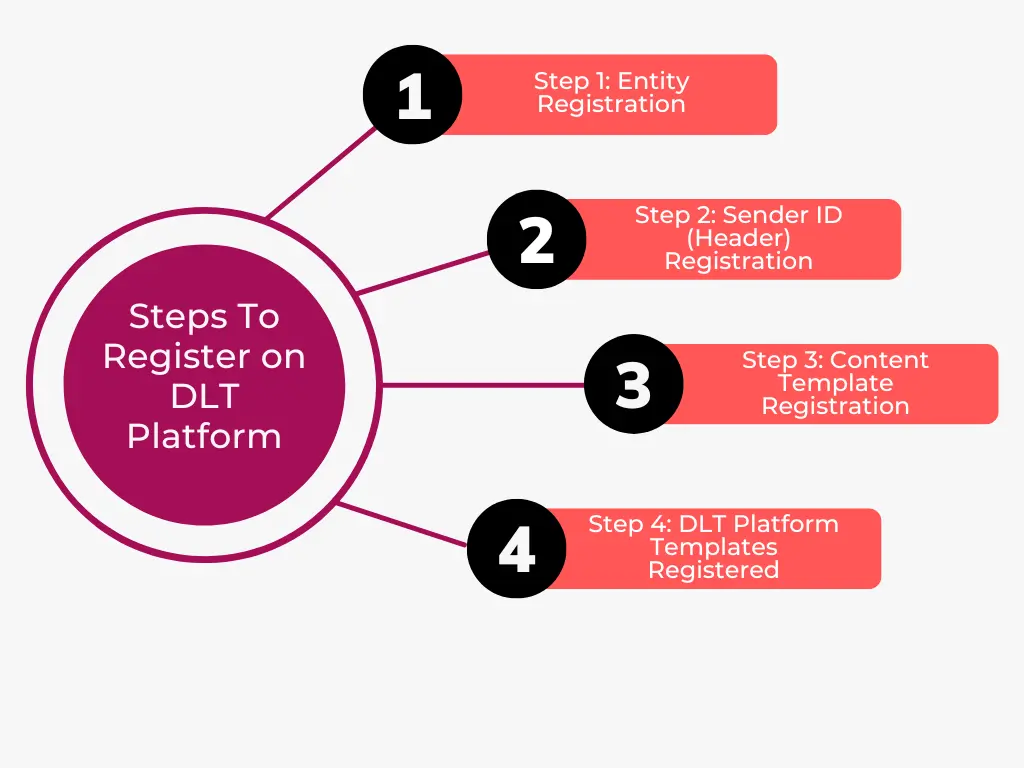
Step 1: Principal Entity Registration
Submit the KYC documents requested by the selected DLT operator. After registration, retain your Principal Entity (PE) ID and account details.
If the portal asks you to add a telemarketer, verify the current name and ID with OnlineSMS and the operator before selecting it.
Step 2: Header (Sender ID) Registration
Messages are classified into Promotional, Transactional, Service Explicit, and Service Implicit. Entities need to register all their headers on the platform. Every header gets a unique Header ID that is shared across other DLT platforms seamlessly.
Step 3: Content Template Registration
Register all the templates on the blockchain DLT SMS system. A template once created, the member retains the template ownership.Each template gets a unique Template ID that is shared across other Blockchain DLT SMS platforms seamlessly. Every Content Template should contain Brand Name(s).
Step 4: Confirm Templates and PE-TM Chain
Once your template gets approve from DLT platform. Require all the approved template in Excel format.
Kindly download (excel format) and email us all the approved templates as provided by operator.
Email: info@onlinesms.in
DLT Support FAQs
Common questions about registration, headers and templates
Who approves my DLT registration, sender header and content templates?
The relevant telecom operator’s DLT platform handles its approval workflow. OnlineSMS can assist with its own service and account-related questions, but cannot guarantee an operator’s approval decision.
Which documents should I submit?
Requirements vary by legal-entity type and operator. Use the checklist above as a starting point and confirm the current official list before submitting documents.
How do I create a PE-TM chain?
Follow the operator portal’s chain-management process and verify the current telemarketer details before submitting. See the PE-TM chain guide.
Why might an SMS be rejected after DLT registration?
Check the message category, approved header, template ID, variable format and exact content against the operator-approved template. See DLT error-code troubleshooting.
Where can I get help from OnlineSMS?
Use the support contacts listed above and verify operator details independently. For related guidance, see DLT message types.